
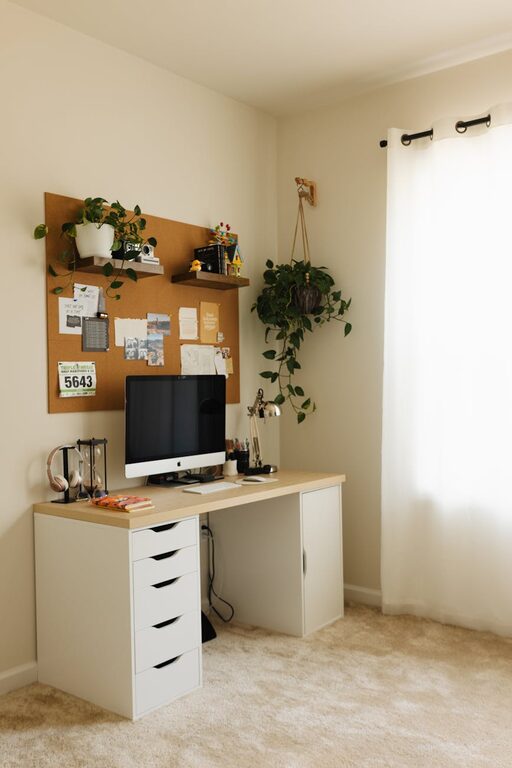
Creating a home office that is both cozy and productive can greatly enhance your work-from-home experience. Whether you’re setting up a new workspace or refreshing an existing one, combining comfort with functionality helps boost focus and motivation throughout your day. Here are some practical tips to help you design a home office that feels inviting and supports your productivity.
Choose the Right Location
The first step in creating a great home office is selecting the ideal spot in your home.
– Natural Light: Try to pick a location near a window to take advantage of natural light. Sunlight can improve mood and reduce eye strain.
– Minimize Distractions: Choose a quiet area away from heavy household traffic. This helps maintain concentration and minimizes interruptions.
– Consider Privacy: If you need to take calls or video meetings, a private space is important for professionalism.
Invest in Comfortable and Ergonomic Furniture
Your furniture plays a major role in both comfort and productivity.
– Ergonomic Chair: Invest in a chair that supports your posture with adjustable height and lumbar support.
– Desk Setup: Select a desk with enough surface area for your computer, notebooks, and other essential tools. Standing desks or adjustable desks can add versatility.
– Proper Monitor Height: Position your monitor so the top is at or slightly below eye level to avoid neck strain.
Optimize Lighting for Comfort and Focus
Good lighting is crucial for reducing eye fatigue and setting the right mood.
– Layer Your Lighting: Combine natural light with ambient (overhead) and task lighting (desk lamps).
– Avoid Glare: Position screens and lamps to avoid reflections or direct glare in your eyes.
– Use Warm Light for Coziness: Warm white LED bulbs create a welcoming atmosphere without sacrificing brightness.
Organize to Reduce Clutter
A tidy workspace helps reduce distractions and boost mental clarity.
– Declutter Regularly: Keep only what you need on your desk. Store other items in drawers, shelves, or containers.
– Use Storage Solutions: Drawer organizers, filing cabinets, and desk trays help keep papers and supplies systematic.
– Cable Management: Use cable organizers or clips to prevent cords from tangling or getting in the way.
Personalize Your Space Thoughtfully
Adding personal touches can make your home office enjoyable without overcrowding it.
– Incorporate Plants: Greenery adds life to your workspace and can help reduce stress.
– Display Inspiring Items: Photos, artwork, or motivational quotes that inspire you can provide positive energy.
– Choose Calming Colors: Use soft, neutral, or pastel tones for walls and decor to create a soothing environment.
Set Up Efficient Technology
Having reliable and easy-to-use technology supports uninterrupted work flow.
– Strong Internet Connection: Ensure your workspace has a stable internet connection for video calls and cloud access.
– Quality Equipment: Use good headphones, a quality webcam, and ergonomic keyboards and mice.
– Backup Devices: Keep external drives or cloud backup services in place to prevent data loss.
Establish Boundaries and Routines
A dedicated office space helps you separate work time from personal time.
– Dedicated Work Hours: Stick to a schedule and avoid mixing work with household chores.
– Use Visual Cues: Closing the door or having a “work mode” sign can remind family members or roommates when you’re working.
– Take Breaks: Step away periodically to stretch, hydrate, and refresh your mind.
Maintain Cleanliness and Air Quality
A clean and well-ventilated space promotes health and concentration.
– Regular Cleaning: Dust and wipe surfaces weekly, and vacuum floors to prevent allergens.
– Air Circulation: Open windows if possible, or use an air purifier to keep air fresh.
– Comfortable Temperature: Use fans, heaters, or air conditioners to maintain a comfortable working temperature.
Final Thoughts
Designing a cozy and productive home office involves balancing comfort with efficiency. By paying attention to lighting, furniture, organization, and personalization, you can create a space that motivates you to work at your best. Remember, the ideal workspace reflects your unique needs while fostering a positive and focused mindset every day.